8x8 & 8x16 & 16x16 & 16x24 & 24x24 Ashlar (11-Tile Module, Layout 2) Tile Pattern Calculator
This layout repeats a 48x64 module of eleven tiles in five sizes — one 16x24, three 8x16, three 16x16, one 24x24 and three 8x8. It belongs to the Ashlar family — see Ashlar Pattern for the reference layout. The 24x24 tile it uses also stands on its own — 24x24 Tile Pattern.
Ashlar Pattern — 8x8, 8x16, 16x16, 16x24 & 24x24 (11-Tile Module, Layout 2)
Opuslay — tile layout worksheet- Room:
- 3 m × 2.5 m
- Units:
- Metric (cm / m²)
- Anchor:
- Left · Top
- Layout angle:
- Straight
- Tile colours:
- Single colour
Material breakdown
| Format | Qty / Pattern | Share | Qty / Room | Area / Room |
|---|---|---|---|---|
| 40x60 cm | 1 | 16.7% | 7 | 1.24 m² |
| 20x40 cm | 3 | 16.7% | 16 | 1.22 m² |
| 40x40 cm | 3 | 33.3% | 19 | 2.56 m² |
| 60x60 cm | 1 | 25.0% | 7 | 1.82 m² |
| 20x20 cm | 3 | 8.3% | 17 | 0.66 m² |
| Total | 11 | 100% | 66 | 7.50 m² |
What you'll need to buy
Tiles to buy
| 20x20 cm | 18 tiles | 0.72 m² |
| 20x40 cm | 18 tiles | 1.44 m² |
| 40x40 cm | 18 tiles | 2.88 m² |
| 40x60 cm | 7 tiles | 1.68 m² |
| 60x60 cm | 7 tiles | 2.52 m² |
Total 68 tiles · 9.24 m² (incl. 23% cuts & breakage)
Adhesive & grout
- Thin-set adhesive: ≈ 40.5 kg (2 × 50 lb bags) — recommended trowel: 12mm notch, large format
- Grout — the tile sets the joint width, not you:
- ≈ 1.8 kg (1 × 10 lb bag) — 3mm joint, rectified / tight-set tile
- ≈ 3.0 kg (1 × 10 lb bag) — 5mm joint, natural or non-rectified tile
Adhesive: allow a little over on an uneven substrate, or if you back-butter large tiles — both eat more than a flat bed.
Grout: the 25 lb bag is the usual size (10 lb for small jobs). Buy it in one go and stick to a single bag size: bags from different batches can dry to slightly different shades.
It's the tile that decides the joint, not the setter — dry-lay a section to find your width. Assumes 9.5mm tile depth; adjust for your product — thicker tiles need more.
Share & export
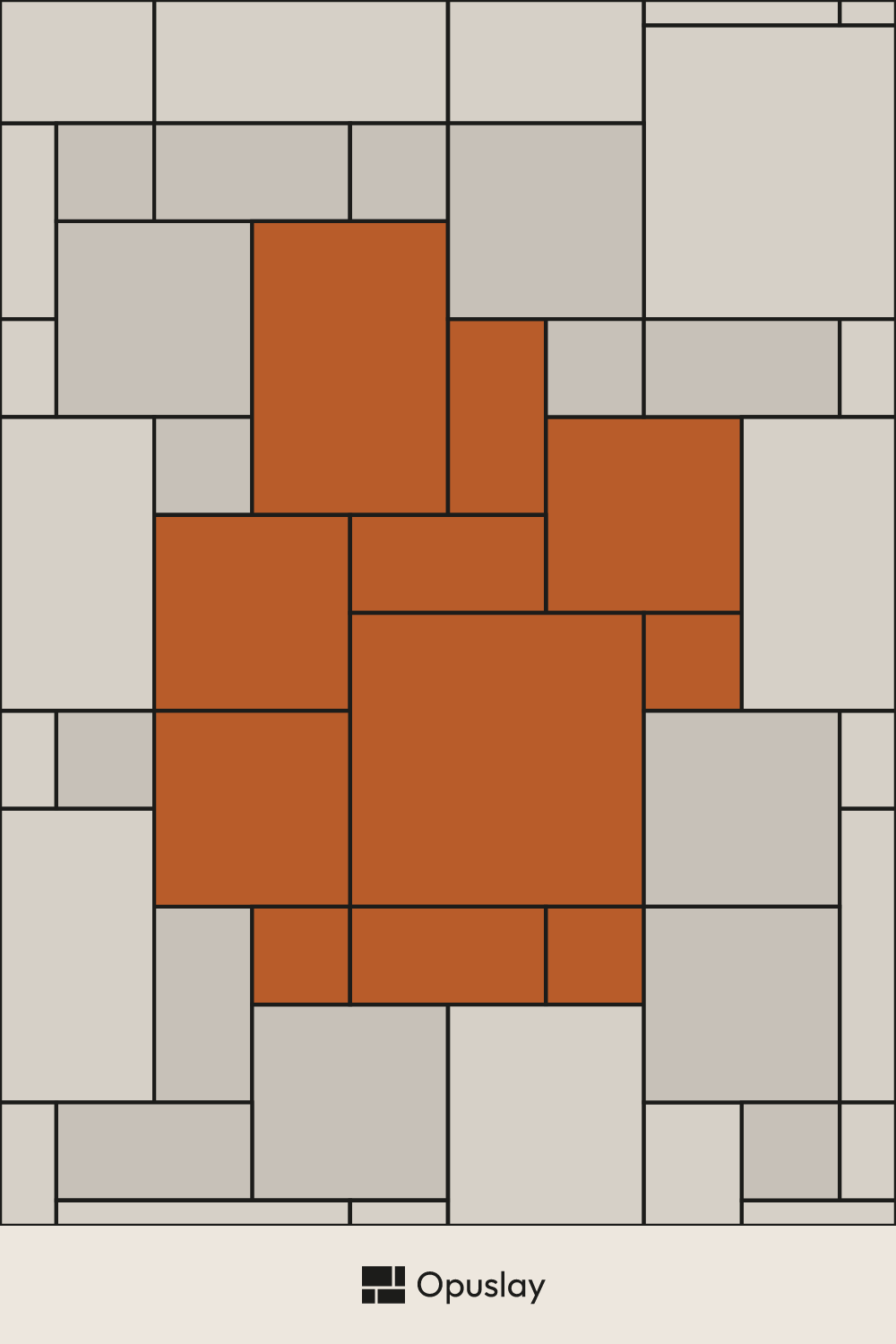
Save the Ashlar Pattern — 8x8, 8x16, 16x16, 16x24 & 24x24 (11-Tile Module, Layout 2) layout to your moodboard, or send the link to your tiler — it reopens with your room dimensions.